---
title: How to install the DemandHub widget on Wordress.
description: How to install the DemandHub widget on Wordress.
---
[Skip to content](https://support.demandhub.co/how-to-install-the-demandhub-widget-on-wordress#main-content)
English
Show submenu for translations

Open main navigation
Close main navigation
- English
Show submenu for translations
- Go to demandhub.co
Go to demandhub.co
Hello. How can we help you?
- There are no suggestions because the search field is empty.
1. [Knowledge Hub](https://support.demandhub.co/?hsLang=en)
2. [Settings](https://support.demandhub.co/settings?hsLang=en)
# How to install the DemandHub widget on Wordress.
### DemandHub WordPress Plugin
To install and activate the DemandHub plugin:
1. Login to your WordPress Admin site.
2. In the left menu, click “Add New Plugin” under the “Plugins” option.
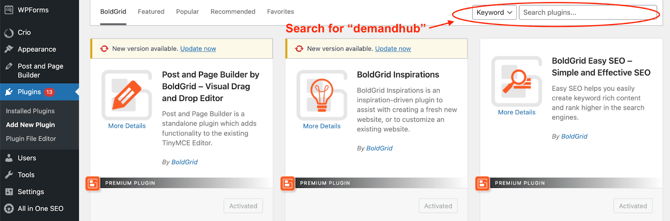
3. In the search box at the right, search for “DemandHub”.
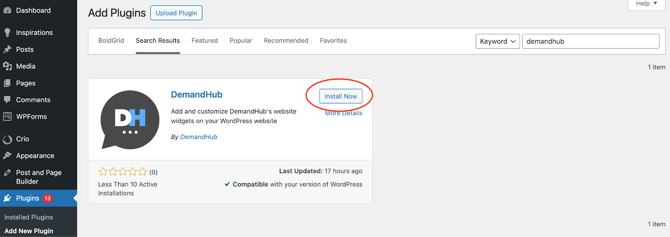
4. When you see the DemandHub plugin, click the “Install Now” button.
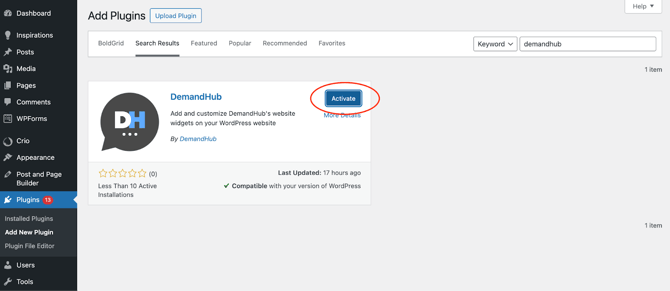
5. After the plugin is installed, click the “Activate” button.
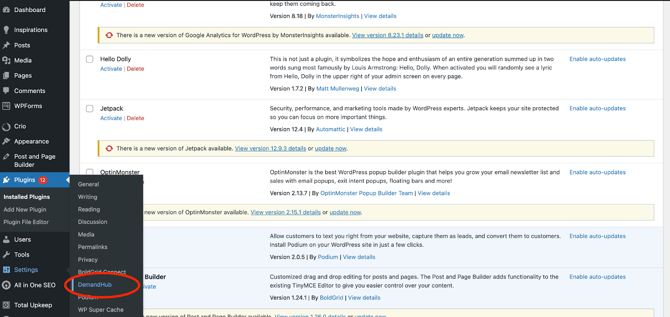
6. Once the plugin is activated, click on the “DemandHub” option in the “Settings” menu on the left.
7. Copy your unique DemandHub code, and paste your unique code into the plugin text box (you should have received this code in your email).
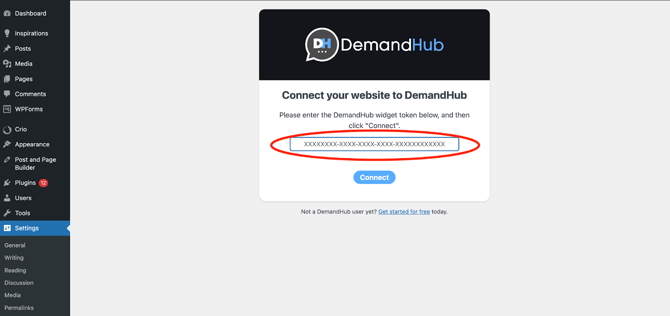
8. Click Connect.
Your DemandHub widgets should now be active on your WordPress website!
- [Getting started](https://support.demandhub.co/getting-started?hsLang=en)
- [Account](https://support.demandhub.co/account?hsLang=en)
- [Reviews](https://support.demandhub.co/reviews?hsLang=en)
- [Settings](https://support.demandhub.co/settings?hsLang=en)
# demandhub.co
[mailto:email@email.com](mailto:email@email.com)
Copyright © 2026, demandhub.co