---
title: Setting up your DemandHub widgets on your NameCheap website
description: A quick guide on how to set up your DemandHub widgets on your NameCheap site
---
[Skip to content](https://support.demandhub.co/how-to-set-up-your-demandhub-widgets-on-your-namecheap-website#main-content)
English
Show submenu for translations

Open main navigation
Close main navigation
- English
Show submenu for translations
- Go to demandhub.co
Go to demandhub.co
Hello. How can we help you?
- There are no suggestions because the search field is empty.
1. [Knowledge Hub](https://support.demandhub.co/?hsLang=en)
2. [Getting started](https://support.demandhub.co/getting-started?hsLang=en)
# Setting up your DemandHub widgets on your NameCheap website
## A quick guide on how to set up your DemandHub widgets on your NameCheap site
### DemandHub Widgets with NameCheap Site Builder
1. Login to your NameCheap Site Builder account, and then click on **Settings** followed by **Pages** in the top menu bar.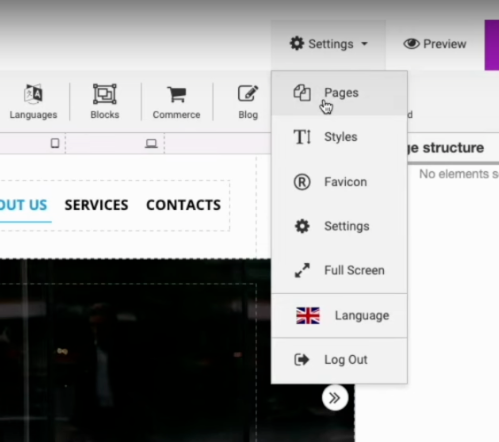
2. Click on the “**Default (for all pages)**” in the left menu, and then click on the **Scripts** tab. 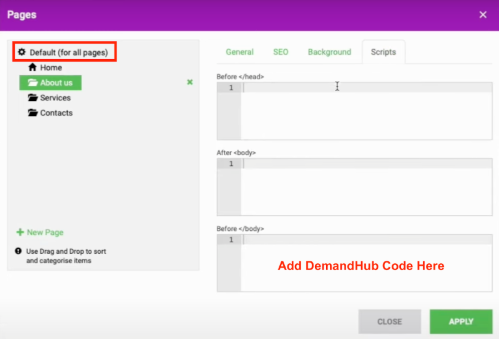
3. Paste your DemandHub widget code into the “**Before \**” section. Click **Apply** to save the changes.
4. Publish your page. The widgets should now be showing on your website.
- [Getting started](https://support.demandhub.co/getting-started?hsLang=en)
- [Account](https://support.demandhub.co/account?hsLang=en)
- [Reviews](https://support.demandhub.co/reviews?hsLang=en)
- [Settings](https://support.demandhub.co/settings?hsLang=en)
# demandhub.co
[mailto:email@email.com](mailto:email@email.com)
Copyright © 2026, demandhub.co